
Welcome to you from the How to Make TikTok Videos for Beginners Review Blog post. TikTok is a fun app where people share short videos. Many people use it to show their talent, share ideas, or just have fun. If you are new to TikTok, making videos can seem hard. But it is not. This guide will help you create TikTok videos step by step.
What is TikTok?
TikTok is a mobile app. You can watch and make short videos here. Videos are usually 15 to 60 seconds long. People use music, dancing, talking, or acting in their videos. TikTok is very popular worldwide. It is a place for fun and creativity.
Do You Need Special Skills?
Not at all. You don’t need to be a video expert. You can start with your phone camera. No fancy tools or skills are required. Many people make great videos using just their phone. The key is to keep it simple and enjoy the process.
Step 1: Download TikTok and Make an Account
- Go to your phone’s app store.
- Search for “TikTok.”
- Download and install the app.
- Open TikTok and create an account.
- You can use your email, phone, or social media to sign up.
Once you have an account, you can watch videos and start making your own.

Step 2: Explore TikTok to Get Ideas
Before making videos, spend some time watching others. See what kind of videos get many views. Notice what people like. This will help you understand what works on TikTok.
Step 3: Plan Your Video
Think about what you want to share. It can be a dance, a joke, a story, or anything you like. Keep your idea simple. Short videos work best on TikTok.
Step 4: Use TikTok’s Built-In Camera
- Open the TikTok app.
- Tap the “+” button at the bottom center.
- You will see the camera screen.
- Pick a sound or music if you want. Tap “Sounds” at the top.
- You can also add filters or effects.
When you are ready, press the red button to start recording. You can record in parts or all at once.
Step 5: Edit Your Video on TikTok
After recording, TikTok lets you edit your video. You can:
- Trim parts of the video.
- Add text on the screen.
- Use stickers or emojis.
- Change the speed of the video.
Keep your edits simple. Do not add too many things at once. This keeps your video clear and easy to watch.
Step 6: Write a Good Caption
Your caption is the text description of your video. Make it short and interesting. You can ask a question or say something funny. A good caption can get more people to watch your video.
Step 7: Post Your Video
- Tap “Next” after editing.
- Choose who can see your video. Public or friends.
- Tap “Post” to share your video.
Now, your video is live on TikTok! People can watch and comment on it.
Step 8: Watch Your Video and Learn
See how many people watch and like your video. Read comments to know what people think. Use this to make better videos next time.
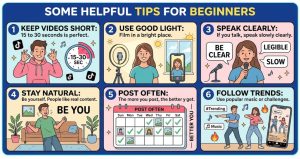
Some Helpful Tips for Beginners:
- Keep videos short: 15 to 30 seconds is perfect.
- Use good light: Film in a bright place.
- Speak clearly: If you talk, speak slowly and clearly.
- Stay natural: Be yourself. People like real content.
- Post often: The more you post, the better you get.
- Follow trends: Use popular music or challenges.
What If You Don’t Want to Film or Edit?
Some beginners don’t want to film or edit videos. This is okay. There are new tools that help create TikTok videos without filming. These tools use artificial intelligence (AI) to make videos for you.
One example is a tool called TokCreator. It scans many popular TikTok videos daily. Then, it creates new videos using AI characters. It can post videos automatically. You do not need to film, edit, or even be on camera.
This tool helps beginners earn money from views alone. You don’t have to sell anything. Just create videos and get paid. It is a simple way to start on TikTok without stress.

Why Use AI Tools for TikTok?
- No need to be shy on camera.
- No filming or editing skills required.
- Save time by auto-posting videos.
- Use winning ideas from trending videos.
- Earn money while you sleep.
AI tools make TikTok easier for beginners. They help create scroll-stopping videos fast.

How to Stay Safe on TikTok?
TikTok is fun but be careful. Protect your privacy. Do not share personal information. Set your account to private if you want. Avoid talking to strangers. Always tell a parent or guardian if something feels wrong.
Summary:
Making TikTok videos is easy for beginners. Follow these simple steps:
- Create a TikTok account.
- Watch other videos to get ideas.
- Plan your video content.
- Use TikTok’s camera and tools to film and edit.
- Add a good caption.
- Post your video and watch for feedback.
- Use AI tools if you don’t want to film.
- Stay safe and enjoy TikTok.
With practice and patience, you will get better. TikTok is a place to have fun and share your creativity. Start today and see what you can make!
Frequently Asked Questions:
How Do I Start Making Tiktok Videos As A Beginner?
Create a TikTok account and explore trending videos first. Use simple ideas and record short clips to practice.
What Tools Help Beginners Make Tiktok Videos Easily?
Use TikTok’s built-in camera and editing features for simple videos. AI tools like TokCreator can automate video creation without filming.
How Long Should Beginner Tiktok Videos Be?
Keep videos between 15 to 30 seconds to hold viewers’ attention. Short videos are easier to make and share.
What Content Works Best For New Tiktok Creators?
Trending topics, funny clips, and challenges attract more views. Focus on popular sounds and hashtags for better reach.